GuidesSeptember 14, 2026· Updated October 7, 2026·9 min read·By Mandeep Cheema
How to Schedule Panel Interviews Without a Coordinator
How do you schedule a panel interview?
Collect availability from the interviewers who must attend, offer the candidate only the times when all of them are free, and send one invitation that lists the panel, the join link and both time zones. Check time zones, buffers and the daylight-saving date before confirming. Done by hand that is a week of email for a four-person panel; done with software it is one link the candidate opens and one click.
This guide shows the hand-rolled version first (so you can sanity-check any tool), then the exact steps in SynqSlot, then what SynqSlot will not do for you, and ends with a checklist you can copy into your hiring doc. For the feature overview and a 60-second walkthrough, see panel interview scheduling.
The manual method, and where it breaks
1Ask each interviewer for three or four 60-minute windows this week and next.
2Intersect them by hand — the overlap is usually two or three slots, often none.
3Offer the candidate those slots; wait; if they pick one that has since been taken, start over.
4Create a calendar event, add every interviewer and the candidate, paste the video link, and reply to the candidate with the details.
5When anyone reschedules, repeat from step 1.
The breaking points are steps 2 and 5. Intersections go stale within hours, and every reschedule restarts the loop. A scheduler is worth it precisely because it recomputes the intersection at the moment the candidate is looking, and again on every reschedule.
Setting it up in SynqSlot (about ten minutes)
Panel links are team booking links, so the interviewers need to be on your team first. Each interviewer connects their own calendar (Google, Outlook/Microsoft 365, or Apple/CalDAV) — that is what makes their busy times visible. Someone who only needs their availability read can join as a calendar-only participant without taking a seat.
1Dashboard → Team: invite the interviewers. Each accepts and connects a calendar.
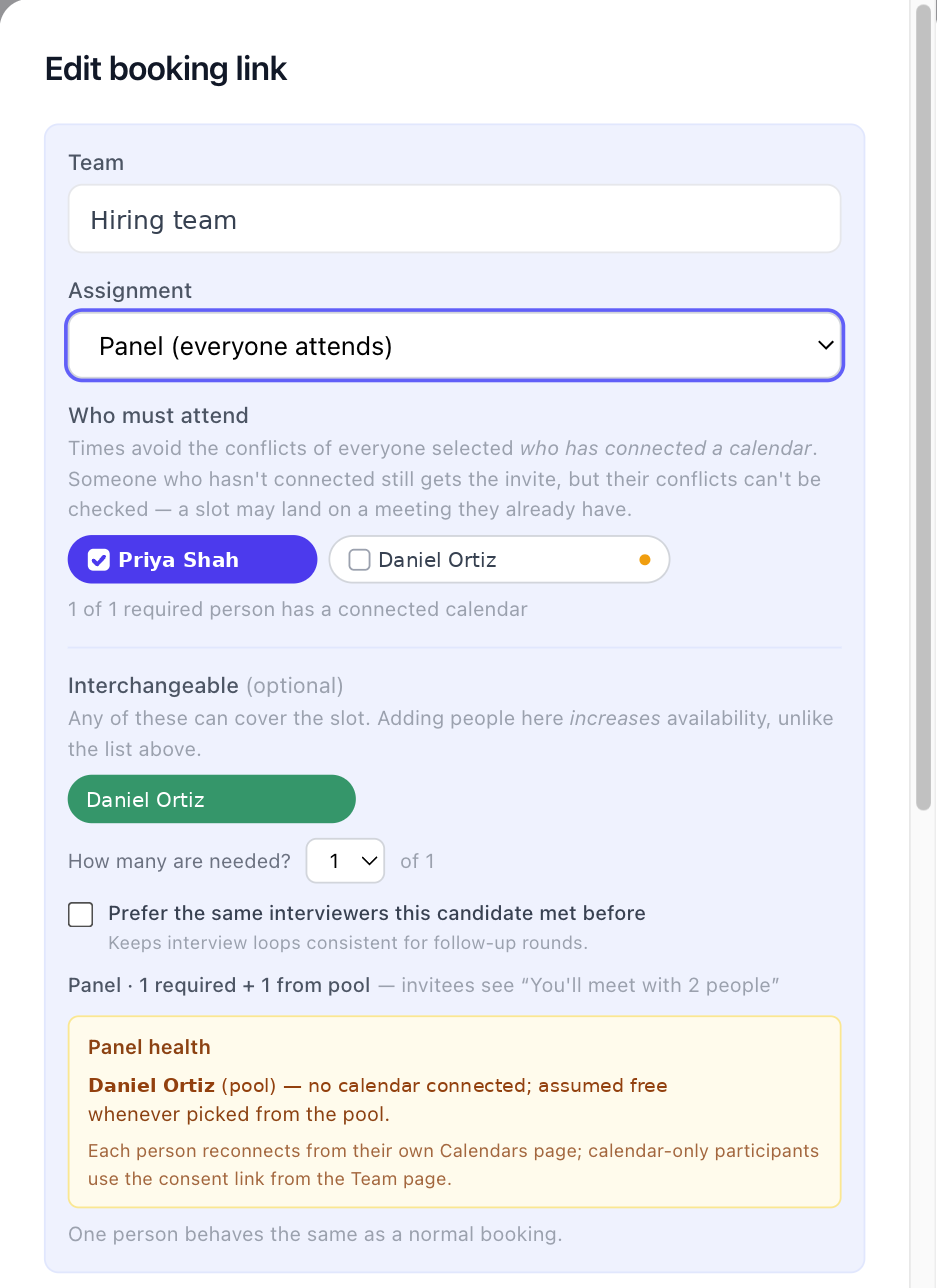
2Dashboard → Booking links → New, and under Assignment choose Panel (everyone attends).
The Assignment section of a booking link. Required interviewers are on every interview; the optional pool fills the remaining seats.
3Tick the required interviewers (the hiring manager, the recruiter). Every offered time is a time all of them are free.
4Optionally add a pool — say six engineers — and set How many are needed? to two. A time is offered when the required people are free and at least two of the pool are, so one engineer's packed calendar never blocks the whole panel. SynqSlot rotates who gets picked so the same two people aren't loaded every time.
5For later rounds, tick Prefer the same interviewers this candidate met before. Continuity only changes who is seated among the people who are free; it never hides a slot.
6Set the duration and buffers, then under Reschedule policy set a limit (two or three moves is sensible). After the limit the candidate is asked to contact you instead of looping.
7Save and open the link yourself. The calendar you see is the live intersection of everyone's hours and calendars.
8Send the candidate the link. One click books it, puts an event on every interviewer's calendar, and emails the candidate one confirmation with the panel listed by name, the join link, and the time in both their zone and yours.
Sending it to one candidate? Use a one-time link (Booking links → One-time links). It works once, reopens if they cancel, and can't be forwarded to someone else. Label it with the candidate's name for your own list — the label is never shown to them.
What happens on a reschedule
The candidate uses the reschedule link in their confirmation. SynqSlot recomputes the intersection at that moment, offers only times the panel is free, moves every interviewer's calendar event, and re-sends the confirmation. The old event is removed only after the new one is confirmed on each calendar, so an interviewer is never left with neither. Once the reschedule limit is reached, the candidate gets a message to contact the recruiter and the recruiter is emailed.
Time zones and daylight saving
Candidates are often in a different zone from the panel. Every confirmation and reminder shows the time in the candidate's zone and the host's. When an interview falls across a clock change on either side, the email says so explicitly — that is the single most common cause of someone arriving an hour early or late.
What SynqSlot won't do (read before you rely on it)
It does not read an interviewer's calendar they haven't connected. An interviewer with no calendar is treated as always free and the link shows a warning in the dashboard; conflicts for that person are not checked.
If a connected calendar stops responding (expired token, revoked permission), the link stops offering times and shows a reconnect notice rather than guessing. A panel that looks bookable but isn't is worse than one that says "please reconnect".
It does not coordinate interviewer preparation — there is no scorecard, feedback form or ATS write-back. It schedules the meeting and hands you the calendar event.
Panel links need a Team plan (Team 5 is $27/month flat, Team 10 is $35/month). Solo accounts can't create them. There is no per-seat fee on either plan.
Availability is computed from working hours plus calendar busy time. It does not understand "I'm free but I'd rather not interview before 10" unless you set that as a working-hours rule or a focus-time block.
Checklist for your hiring doc
Every interviewer is on the team and has a connected calendar (check Dashboard → Team).
Required interviewers are marked required; everyone else is in the pool with a "how many" number.
Fairness rotation is on if the pool is bigger than the number needed; continuity is on for second rounds.
Duration includes a 5–10 minute buffer on each side.
Reschedule limit set to two or three.
Candidates get a one-time link, not the shared link.
Someone checks the reconnect notice in the dashboard once a week.
Questions people ask next
Can one interviewer be optional? Yes — put them in the pool and set the needed count to zero of that pool, or simply leave them off the required list. Required means every offered time depends on them.
What if the candidate is in Europe and the panel is in North America? Nothing to configure. Times are shown in the candidate's zone on the booking page and both zones in the email; set your working hours and the overlap takes care of itself.
Can I offer two different panels for two roles? Yes — one panel booking link per role, each with its own interviewers, duration and reschedule policy.
Does it work with Microsoft 365 / Outlook? Yes. Google, Microsoft 365/Outlook and Apple/CalDAV calendars can all be connected, and a panel can mix them.